Slides to TV
IT'S NOT SIGNAGE. IT'S HELP.

Your TVs can help pay for themselves.
Sell sponsor slots, and prove they ran.

The people watching your screens — your members, your regulars — are exactly the customers every local business wants. Sell those businesses a slot in your rotation, and hand each one monthly proof their ad actually ran. You already own the screens.

A live music night announcement A local sponsor’s ad offering members a discount
The Reports page with per-slide display numbers
A local sponsor’s ad on your TVs — and the monthly report that proves it ran.
THE PITCH TO A SPONSOR

"Your ad, on our screens, every day — with receipts."

A local funeral home, insurance agent, or landscaper wants to reach the same local faces week after week. So does the beer distributor for a bar, or the car dealer down the road for a restaurant. Their ad runs in your rotation all month, in front of the same faces, night after night.

  • They hand you their artwork — or you type their offer and the AI designs the ad for them. Ads made in PowerPoint or Canva come straight in too.
  • Add a QR code to their ad — a coupon, a booking page, a free quote — and every scan is counted.
  • You choose where it plays: every screen, or just the bar, the lobby, the dining room.
  • It never runs longer than agreed — set an end date and the slide retires itself.
A local sponsor’s ad offering members a discount
THE PROOF THAT SELLS RENEWALS

Every advertiser gets their numbers. Monthly.

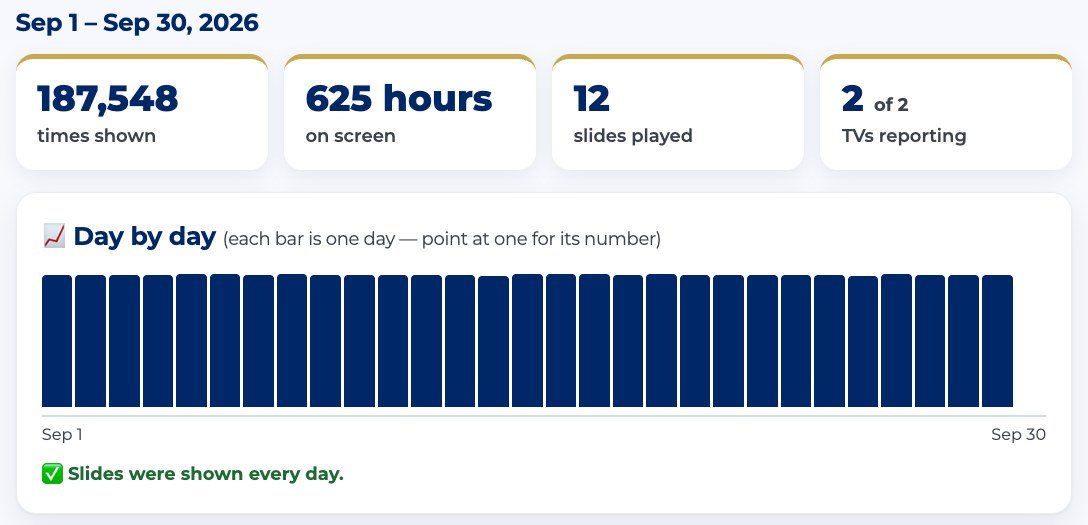
Proof like this helps sponsors decide to renew. Label a slide with the advertiser's name and Reports builds their story automatically.

  • The one-pager: a hand-them-this PDF with their month's totals and a day-by-day chart proving the ad ran.
  • Times shown, hours on screen, which TVs, first and last day — counted by the screens themselves.
  • Emailed to them automatically every month — add their email once and you never have to remember.
  • QR scans sit right next to the display numbers — an all-time count of every time someone scanned the ad's code — so they see people acting on the ad, not just walking past it.
  • Works retroactively: label the slide today, pull last month's numbers anyway.
  • The advertiser program — one-pagers and monthly emails — comes with Pro ($89 a month, less with a 1-year agreement) and the Community plan. QR codes are Pro.
The Reports page with per-slide display numbers
HOW TO RUN IT

Three steps, once a month.

  1. Make the ad — their artwork or an AI slide, put it in the rotation with an end date.
  2. Type their name in the slide's Advertiser box — that's the whole setup.
  3. Let the monthly email send their numbers — or print the one-pager and hand it over with the renewal invoice.

No ad server, no trafficking spreadsheet, no counting anything by hand. The person who runs your TVs can run your ad program.

The slide Library where you label each ad with the advertiser’s name

The math your treasurer will like

An example — you set what sponsors pay:

4
local sponsors
×
$50/mo
each (the low end)
=
$200/mo
from screens you already own

That covers the Pro plan ($89/mo) with $111 a month left over.

This is an example, not a promise — what sponsors pay is up to you and them. The point: a few sponsors can help cover the cost.

Have a sponsor in mind already?

Bring their name to a 15-minute demo — we'll build their ad and show you the report they'd get.